How to Schedule Facebook Posts in 2026: Complete Guide (Free & Paid Methods)
Learn how to schedule Facebook posts using free and paid methods. Complete 2026 guide covering Meta Business Suite, Creator Studio, and third-party tools.
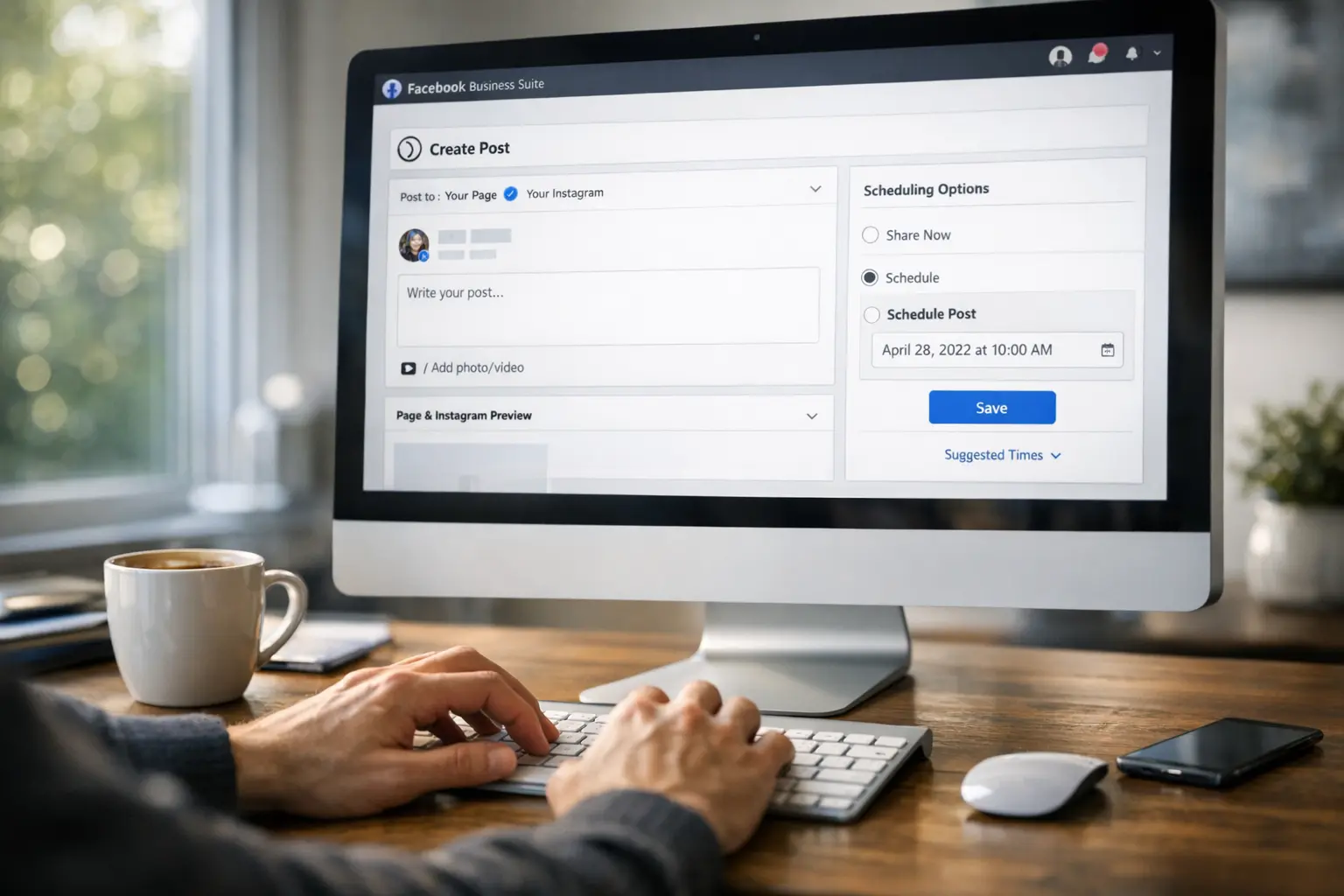
Learning to schedule Facebook posts transforms how you manage your social media presence. Instead of logging in multiple times daily to publish content, you can plan your entire week or month in advance, then focus on other aspects of running your business or creating content.
Facebook scheduling has evolved significantly from its early days. Meta now provides robust native scheduling through Business Suite, while third-party tools offer additional features for creators who need more sophisticated workflows. This guide walks you through every method available in 2026, helping you choose the approach that fits your needs.
Whether you manage a business page, create content professionally, or simply want more control over your posting schedule, understanding Facebook scheduling options makes consistent publishing achievable without constant platform attention.
Why Scheduling Facebook Posts Matters
The case for scheduling extends beyond simple convenience. When you schedule content in advance, you gain strategic advantages that manual posting cannot provide.
Consistency represents the primary benefit. Facebook’s algorithm favors accounts that post regularly, and your audience develops expectations based on your publishing rhythm. Manual posting makes consistency difficult—busy days, vacations, and unexpected demands push social media down your priority list. Scheduling ensures your content goes live regardless of what else demands your attention.
Quality improves when you’re not rushing. Writing a caption while simultaneously trying to publish it means settling for good enough. Batch-creating content during dedicated sessions allows for editing, refinement, and strategic thinking about how each post connects to your broader goals.
Optimal timing becomes achievable with scheduling. Your audience might be most active at 7 PM, but you might be making dinner or commuting. Scheduling lets you hit peak engagement windows without rearranging your life around publication times.
Strategic planning emerges naturally from the scheduling process. When you see your content calendar laid out across weeks, gaps and imbalances become visible. You notice that you’ve scheduled three promotional posts in a row, or that you haven’t shared educational content recently. This visibility enables adjustment before publication rather than retrospective regret.
Scheduling Through Meta Business Suite
Meta Business Suite serves as the primary free method for scheduling Facebook content. Since Meta owns Facebook, the integration is complete and officially supported, making this the most reliable free option available.
Before you begin, ensure you’re working with a Facebook Page rather than a personal profile. Personal profiles have limited scheduling capabilities while Pages receive the full feature set. If you haven’t already converted to a Page or created one for your business or creator brand, that’s your first step.
Access Business Suite by navigating to business.facebook.com in your web browser. Log in with the Facebook account that has admin access to your Page. If you manage multiple Pages, select the appropriate one from the account switcher in the top navigation.
The Content Planner section provides your scheduling hub. Navigate here to see a calendar view of all scheduled and published content. This visual representation helps you understand your posting cadence at a glance and identify gaps or clustering in your schedule.
When you’re ready to create scheduled content, click the Create Post button prominently displayed in the interface. The composer opens with options for your post content. Write your caption, add images or video, and configure any additional options like location tagging or audience targeting.
Look for the scheduling option near the publish button. This typically appears as a dropdown arrow or a calendar icon depending on which version of the interface you’re using. Click to access date and time selection. Choose when you want your post to appear on your Page. Confirm your selection, and Business Suite queues your content for automatic publication.
Managing scheduled posts happens in the Content Planner calendar view. Click any scheduled item to preview it, make edits, change the scheduled time, or delete it entirely. This flexibility means your schedule isn’t locked—adjustments remain possible until the moment of publication.
Using Creator Studio for Scheduling
Creator Studio still functions as an alternative scheduling interface, though Meta has been transitioning features toward Business Suite. Some users prefer Creator Studio’s different organization and workflow.
Access Creator Studio at business.facebook.com/creatorstudio. The interface focuses specifically on content creation and publishing rather than the broader business management features of Business Suite.
Navigation works similarly to Business Suite. Select your Page, create content through the composer, and use scheduling options to set future publication times. The calendar view shows upcoming scheduled content for review and management.
While Creator Studio remains functional, new users should generally start with Business Suite since that’s where Meta focuses development resources. Creator Studio might eventually be fully consolidated into Business Suite, so learning the newer system ensures long-term skill applicability.
Third-Party Scheduling Tools
Beyond Meta’s native options, third-party scheduling platforms offer enhanced features that justify their subscription costs for many creators and businesses.
BrandGhost provides scheduling designed specifically for content creators managing multiple platforms. Rather than maintaining separate workflows for Facebook, Instagram, and other networks, you create content once and schedule it across all your connected platforms. The unified calendar shows everything in one view, making cross-platform coordination straightforward.
Buffer offers a clean, simple interface that emphasizes ease of use. The free tier covers basic scheduling needs, while paid plans unlock additional team members, analytics, and scheduling capacity.
Hootsuite serves larger teams and agencies managing many clients. Its comprehensive feature set includes content approval workflows, detailed analytics, and social listening capabilities beyond basic scheduling.
Later specializes in visual content planning with a drag-and-drop calendar interface. Originally Instagram-focused, it now supports Facebook and other platforms with scheduling and visual planning tools.
Sprout Social targets enterprise users needing sophisticated reporting, CRM integration, and team coordination features alongside scheduling.
The right choice depends on your specific situation. Single creators managing one or two platforms might find Meta’s free tools sufficient. Multi-platform creators benefit from unified tools like BrandGhost. Teams and agencies typically need the collaboration features found in Hootsuite or Sprout Social.
Scheduling Different Content Types
Facebook supports numerous content formats, each with scheduling considerations worth understanding.
Standard feed posts—text with optional images—schedule most simply. These appear on your Page timeline and in your followers’ News Feeds according to algorithmic distribution. Any scheduling tool handles these without complication.
Video posts require attention to upload and processing time. Longer videos take time to upload and process, which can affect your scheduling workflow. Upload videos well before their scheduled time to avoid last-minute failures. Some tools let you schedule with a draft that you finalize later, which helps with large video files.
Facebook Reels have become increasingly important for reach. Scheduling Reels through Business Suite works similarly to other content, though you’ll want to ensure your vertical video meets Reels specifications before scheduling. Our guide on scheduling Facebook Reels covers this format specifically.
Facebook Stories offer scheduling through Business Suite, allowing you to plan ephemeral content in advance. Remember that Stories disappear after 24 hours regardless of when you schedule them—the scheduling controls publication time, not lifespan. See our Facebook Stories scheduling guide for complete details.
Link posts that preview external content work well with scheduling. Enter your URL, let Facebook generate the preview, edit the accompanying text, and schedule as normal. Test that the link preview appears correctly before confirming your schedule.
Building an Effective Scheduling Workflow
Having scheduling capabilities matters less than using them effectively. Developing a sustainable workflow turns scheduling from a tool into a transformative practice.
Designate specific time for content creation and scheduling. Perhaps Sunday afternoon becomes your content planning window, or you batch-create during the first hour of Monday morning. This dedicated time prevents scheduling from becoming another competing demand on your attention.
Plan before you schedule. Develop a simple content calendar—even a spreadsheet with dates and post ideas—before opening your scheduling tool. Knowing what you want to communicate makes the technical process of scheduling much faster.
Create content in batches. Writing five posts in one session takes less total time than writing one post on five separate occasions. Batching eliminates the startup cost of switching into content creation mode repeatedly.
Build a content buffer. When inspiration strikes, create extra content and schedule it for the future. This buffer protects you during creative dry spells or unexpectedly busy periods. Having several weeks of content queued reduces pressure significantly.
Review scheduled content regularly. Set a weekly reminder to scan upcoming posts. Circumstances change, and content that made sense when you scheduled it might be inappropriate by publication time. Regular review prevents embarrassing misalignments.
Timing Strategies for Scheduled Posts
When your content goes live affects how many people see it. Scheduling enables precision timing that optimizes for audience attention.
Facebook Insights reveals when your specific audience is online. Navigate to your Page’s Insights section and examine the Posts area to see audience activity patterns. Schedule content for windows when your followers are most active.
General patterns suggest weekday mornings and lunch hours often work well, but your audience might differ. A restaurant page sees different patterns than a B2B software company. Trust your own data over generic recommendations.
Consider what happens after publication. Engagement in the first hour signals value to Facebook’s algorithm, influencing how widely your content distributes. If you schedule for a time you won’t be available to respond to comments, you might miss opportunities to boost that early engagement.
Time zones complicate scheduling for audiences spread geographically. If your followers span multiple time zones, you might schedule the same content for different times, or choose times that work reasonably well across zones. Our guide on optimal Facebook posting times explores timing strategy in depth.
Scheduling for Facebook Groups
Facebook Groups have different scheduling mechanics than Pages. Group scheduling capabilities depend on your role within the group and the group’s settings.
If you administer a Group, you can schedule posts from within the group’s interface. Look for scheduling options when creating a post. This native scheduling works similarly to Page scheduling, allowing you to queue content for later publication.
For Groups you don’t administer, scheduling options are limited. Third-party tools generally cannot post to Groups you’re simply a member of, due to Facebook’s API restrictions designed to prevent spam.
Our complete guide on scheduling Facebook Group posts covers the nuances and workarounds for Group scheduling in detail.
Mobile Scheduling Options
Scheduling isn’t limited to desktop computers. Mobile options let you create and schedule content from anywhere.
The Meta Business Suite app for iOS and Android provides full scheduling capabilities on your phone or tablet. The same features available in the web interface work in the mobile app, sized appropriately for smaller screens.
Creating content on mobile offers advantages when your content includes photos or videos captured on your phone. Rather than transferring files to a computer, you can compose and schedule directly from your mobile device.
Third-party apps similarly offer mobile scheduling. BrandGhost, Buffer, and most other scheduling platforms have mobile apps that sync with their web counterparts. Content scheduled from any device appears in your unified calendar.
Avoiding Common Scheduling Mistakes
Certain mistakes undermine the benefits of scheduling. Awareness helps you avoid these pitfalls.
Setting and forgetting leads to problems. Scheduled content published without review might be tone-deaf following unexpected events, contain outdated information, or conflict with developments in your business. Review what’s scheduled before it publishes.
Ignoring engagement during scheduled times wastes the visibility your content generates. Scheduling handles publishing, not community management. Plan to be available for responding to comments when your content goes live, even if you weren’t actively posting at that moment.
Over-automating removes authenticity. If every post is scheduled weeks in advance, you lose the ability to respond to current events, join trending conversations, or share spontaneous moments. Balance planned scheduling with room for real-time participation.
Inconsistent scheduling undermines the consistency advantage. If you schedule sporadically—bursts of content followed by long gaps—you’re not actually achieving the consistency that makes scheduling valuable. Commit to regular scheduling sessions.
Conclusion
Learning to schedule Facebook posts effectively simplifies consistent publishing while improving content quality and strategic planning. Whether you use Meta’s free Business Suite or invest in third-party tools, the core benefits remain consistent: freed time, better timing, and enhanced visibility into your content strategy.
Start with the method that matches your current needs. If you manage only Facebook, Business Suite handles everything competently at no cost. If you work across multiple platforms or need team collaboration, explore paid tools that consolidate your workflows.
For specific content types, explore our detailed guides on scheduling Facebook Reels, scheduling Facebook Stories, and free scheduling methods.
Frequently Asked Questions
Can I schedule posts to my personal Facebook profile?
Facebook limits personal profile scheduling compared to Pages. You can use Facebook's native scheduling feature for personal profiles, but third-party tools are restricted from posting to personal profiles due to API limitations. For full scheduling capabilities, create a Page or use Facebook's built-in options.
How far in advance can I schedule Facebook posts?
Meta Business Suite allows scheduling up to 29 days in advance. Some third-party tools can schedule further ahead, with limits varying by platform. For most content strategies, one month of advance scheduling provides sufficient runway.
Will scheduled posts perform differently than manually posted content?
No. Facebook's algorithm treats scheduled posts identically to manually published content. Only the content itself and its timing affect performance—the scheduling mechanism does not influence distribution.
Can I edit a post after it's been scheduled?
Yes. Find the scheduled post in your Content Planner or scheduling tool, click to edit, make your changes, and save. You can also reschedule to a different time or delete the post entirely before it publishes.
What happens if I'm offline when a scheduled post is supposed to publish?
The post publishes automatically regardless of your connectivity. Scheduling queues content on Facebook's servers, which handles publication independent of your device's status.