Best Online Character Counter for Social Media Posts (Free Tool + Guide)
Learn how to use the best online character counter for social media posts to stay within limits on every platform, and post confidently.
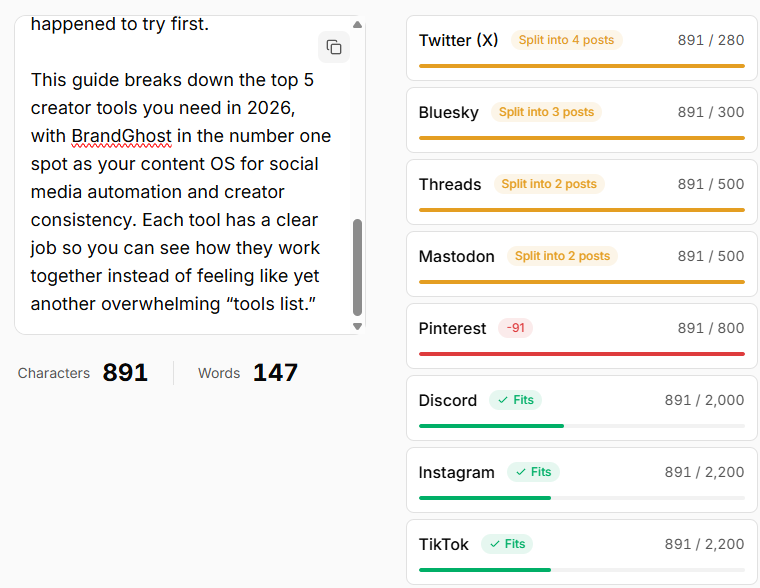
If you publish across multiple platforms, character count is one of those tiny details that quietly ruins posts—and the best online character counter for social media posts can quietly prevent a lot of that frustration.
You write a great update, paste it into Twitter (X), Threads, and Bluesky… and suddenly:
- Your hook gets cut off
- Links or @handles disappear
- You’re guessing where to split threads or carousels
That’s exactly where a best online character counter for social media posts earns its keep—especially when it understands platform limits and can help you auto-split long content instead of just showing a raw number.
This guide walks you through:
- Why social media character limits matter more than most creators think
- How a social-aware character counter is different from generic text tools
- The kinds of long-tail workflows you can support (threads, carousels, captions)
- How BrandGhost fits in with character-aware scheduling and auto-splitting
Note: This article is designed to support a free BrandGhost Character Counter Tool that lets you paste text once, see per-platform counts, and preview safe vs over-limit posts.
Why Character Count Matters for Social Media
Character limits aren’t just arbitrary numbers—they shape how your content shows up:
- Truncation in feeds – Key hooks can get cut, especially on mobile.
- Link visibility – Long intros can push URLs below the fold.
- CTA clarity – Splitting a post at the wrong place can bury the ask.
- Platform formatting quirks – Line breaks, emojis, and URLs sometimes count differently.
When you only post on one platform, it’s manageable. When you cross-post to Twitter, Threads, Bluesky, TikTok descriptions, YouTube descriptions, and more, manual character counting quickly becomes a tax on your creativity.
A focused online character counter for social media removes that friction.
Generic Character Counter vs Social-Aware Character Counter
Most generic character counters:
- Only show a single number
- Have no opinion about platform limits
- Don’t help you decide where to trim or split
A social-aware character counter, on the other hand, should:
- Show per-platform limits (Twitter/X, Threads, Bluesky, TikTok, etc.)
- Flag when your text is over-limit for any platform
- Suggest safe ranges where hooks and CTAs stay intact
- Help you split long posts into threads or multi-part posts
That’s the gap the upcoming BrandGhost character counter is designed to fill.
For official reference on how character limits work today, you can always check the Twitter Help Center.
How to Choose the Best Online Character Counter for Social Media Posts
Not every tool that calls itself a “character counter” is equally helpful for creators.
When you evaluate the best online character counter for social media posts, look for:
- Per-platform awareness – Twitter/X, Threads, Bluesky, TikTok, and YouTube limits built in.
- Clear warnings – obvious flags when you’re over a specific platform’s safe range.
- Preview of splits – guidance on how to break long posts into threads or sequences on platforms like Twitter/X, Bluesky, Threads, and Mastodon.
- Export or scheduling options – the ability to send final content into your planner or scheduler.
BrandGhost’s broader system can then take that character-aware draft and:
- Save it into an evergreen library
- Schedule it across platforms
- Automatically split long posts into threads or sequences on platforms like Twitter/X, Bluesky, Threads, and Mastodon
The goal isn’t just to count characters. It’s to make sure you can ship content confidently across platforms without memorizing every limit.
Use Cases for a Social Media Character Counter
Here are some real workflows where a best online character counter for social media posts becomes essential:
1. Turning Threads into Cross-Platform Posts
You might start with a Twitter/X thread and want to:
- Keep each tweet under the current character limit
- Turn the same content into a single Threads post
- Use a shortened version as a Bluesky post or TikTok description
A good counter helps you:
- Check if the combined copy is safe for Threads or Bluesky
- Create a shorter “caption version” for TikTok.
2. Making Sure Hooks Don’t Get Cut Off
On platforms with preview truncation, your first 1–2 lines matter most.
A character counter can highlight:
- “Hook-safe” ranges for each platform
- Whether your opening line is likely to be fully visible
This is especially helpful when recycling content across YouTube descriptions, Threads posts, and Twitter threads.
3. Writing Bluesky Posts with Room for Hashtags
If you write a beautiful post and then cram hashtags at the end, you risk hitting limits and silently losing some of them.
A focused Bluesky character counter can:
- Reserve space for a fixed number of hashtags
- Let you know when you’re running into trouble
4. Staying Inside Platform-Specific Limits
Different platforms have different character limits for:
- Posts
- Headlines or titles
- About/bio or summary sections
A multi-field social media character counter can show them side by side so you’re not guessing.
How BrandGhost Extends Beyond a Simple Counter
Most people don’t wake up wanting a character counter—they want:
- More consistent posting
- Safer cross-posting
- Less time fixing errors
BrandGhost can turn character counting into a background concern by:
- Checking content against per-platform character limits before scheduling
- Automatically splitting long posts into threads or sequenced posts
- Supporting evergreen content and content repurposing workflows
Think of the free online character counter as a gateway:
- Try the tool to fix a specific post
- Realize how much time it saves
-
Then let BrandGhost handle the ongoing automation and splitting for everything else
- Explore BrandGhost: https://www.brandghost.ai
- Character Counter Tool: Count for free now
Where This Fits in Your Content System
A social media character counter pairs naturally with:
- Topic-based planning – Draft once, then adapt per platform with limits in mind
- Cross-posting – Confidently reuse ideas without manual reformatting
- Evergreen queues – Store character-safe posts you can resurface later
If you already use BrandGhost for topic streams, evergreen queues, and cross-posting, the counter becomes one more guardrail that keeps your system reliable.
FAQ
What is the best online character counter for social media posts?
The best tools don’t just show a number—they map your text against per-platform limits for Twitter/X, Threads, Bluesky, TikTok, and more. A character counter that plugs into a scheduler like BrandGhost is ideal, because it can also help you auto-split and schedule long posts on platforms that support sequences, like Twitter/X, Bluesky, Threads, and Mastodon.
Why not just use the built-in counters in each app?
Native apps tell you when you’ve gone too far—often after you’ve written everything. An external counter lets you plan ahead, compare platforms side by side, and avoid last-minute rewrites.
Will emojis and URLs count the same as plain text?
Different platforms handle emojis and URLs slightly differently, but a good online character counter will approximate what matters most: whether your real message fits into the visible space.
Do I need a separate character counter for each platform?
Not if your tool understands multiple platforms. A social media character counter that supports Twitter, Threads, Bluesky, TikTok, and others in one place is more efficient than juggling separate tools.
How does BrandGhost help beyond counting characters?
BrandGhost is designed as a content OS for creators: it helps you plan topics, repurpose posts, schedule across platforms, and keep everything within character limits—often auto-splitting longer content so you don’t have to think about it.